
Vuex

Vuex 是什么?

Vuex 是一个专为 Vue2.js 应用程序开发的状态管理模式。它采用集中式存储管理应用的所有组件的状态,并以相应的规则保证状态以一种可预测的方式发生变化。是一个状态共享框架

  • Vuex是采用集中式管理组件依赖的共享数据的一个工具,可以解决不同组件数据共享的问题
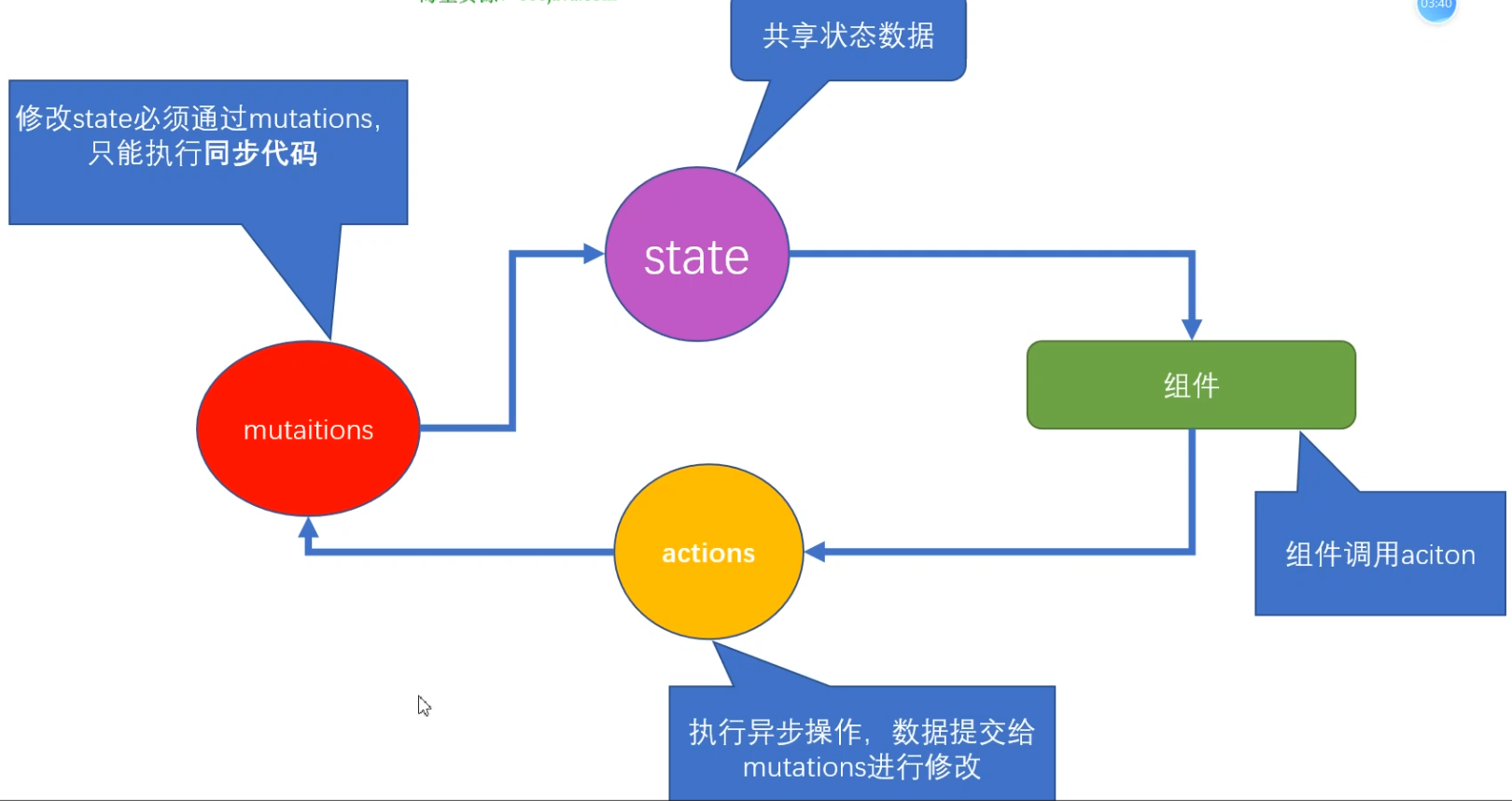
image-20240717183423420

Vuex基础-初始化功能(store)

每一个 Vuex 应用的核心就是 store(仓库)。“store”基本上就是一个容器,它包含着你的应用中大部分的**状态 (state)**。Vuex 和单纯的全局对象有以下两点不同:

  1. Vuex 的状态存储是响应式的。当 Vue 组件从 store 中读取状态的时候,若 store 中的状态发生变化,那么相应的组件也会相应地得到高效更新。
  2. 你不能直接改变 store 中的状态。改变 store 中的状态的唯一途径就是显式地提交 (commit) mutation。这样使得我们可以方便地跟踪每一个状态的变化,从而让我们能够实现一些工具帮助我们更好地了解我们的应用。

建立一个新的脚手架项目, 在项目中应用vuex

1
$ vue create  learnvuex

初始化:

  • 第一步:npm i vuex --save => 安装到**运行时依赖** => 项目上线之后依然使用的依赖 ,开发时依赖 => 开发调试时使用 (注意对应版本,vue2对应vuex3,vue3对应vuex4)

  • 第二步: 在main.js中 import Vuex from 'vuex'

  • 第三步:在main.js中 Vue.use(Vuex) => 调用了 vuex中的 一个install方法

  • 第四步:const store = new Vuex.Store({...配置项})

  • 第五步:在根实例配置 store 选项指向 store 实例对象

1
2
3
4
5
6
7
8
9
10
11
12
13
14
15
16
17
//这是main.js中(第一步是安装vuex)
import Vue from 'vue'
//第二步
import Vuex from 'vuex'
import App from './App.vue'

//第三步全局注册vuex
Vue.use(Vuex)
Vue.config.productionTip = false
//第四步
const store = new Vuex.Store({})
new Vue({
//第五步,把store应用于vue实例对象
store,
render: h => h(App),
}).$mount('#app')

Vuex基础—State

单一状态树

Vuex 使用单一状态树——是的,用一个对象就包含了全部的应用层级状态。至此它便作为一个“唯一数据源 (SSOT (opens new window))”而存在。这也意味着,每个应用将仅仅包含一个 store 实例。单一状态树让我们能够直接地定位任一特定的状态片段,在调试的过程中也能轻易地取得整个当前应用状态的快照。

组件中获得state

在组件中我们最简单的获取方式是通过计算属性来获得存储在state中的数据。

第一步:获取store实例,Vue2中通过this.$store来获取,Vue3中使用函数useStore这两种方法是等效的,只是不同版本获取方式不同
下面我用Vue3举例

1
2
3
4
//引入函数
import { useStore } from 'vuex';
//创建store实例
const store = useStore()

第二步:使用计算属性来动态的获取state中的数据,这样当state中数据更新时,会同步更新(注意vue2和vue3的计算属性写法不一样)

1
2
3
4
//使用计算属性来访问store中存储的数据
const count = computed(()=> {
return store.state.count
})

第三步:模板渲染,查看结果

image-20240920113042143

mapState 辅助函数(难点)

Vue2中,我们通常会按照下面这种写法:

这里引入这个函数目的是:当我们在state中存储了较多的数据时,通过上述方式会频繁的使用计算属性来获取数据,这样就导致了我们代码量增多,于是引入mapState函数来帮我们快速生成

1
2
//导入辅助函数
import { mapState } from 'vuex'

使用该函数会自动帮我们生成计算属性

这里的...是ES6中的延展运算符,它相当于会解析数组的内容并展开为多个独立的参数,比如

1
2
let arr1 = [1, 2, 3];
let arr2 = [...arr1, 4]; // arr2 现在就成为了 [1, 2, 3, 4]
1
2
3
4
5
6
7
8
9
10
11
12
13
14
15
computed: {
...mapState({
count: state => state.count,

countPlusLocalState(state) {
return state.count
}
})
//也可以这么写,传入一个数组
...mapState(['count'])
//上面的写法就相当写一个下面这样的计算属性
count(){
return this.$store.state.count
}
}

当映射的计算属性的名称与 state 的子节点名称相同时,我们也可以给 mapState 传一个字符串数组。

Vue3中,我们通常将其封装为一个hooks,来使用。封装的步骤如下:该hooks为userState

1
2
3
4
5
6
7
8
9
10
11
12
13
14
15
16
17
18
19
20
21
22
23
24
25
//封装一个hooks来在vue3中使用mapState
import { useStore, mapState } from "vuex";
import { computed } from "vue";

export default function(mapper){
//创建store
const store = useStore();
//获取相应的对象 :mapState函数的返回值是类似于这样的一个对象 {count:function}
const storeStateFns = mapState(mapper);

//将 $store的
const storeState = {};
Object.keys(storeStateFns).forEach((FnKey)=>{
//由于setup中没有this的指向,我们在计算属性中计算state时需要用到$store所以这里使用bind()来将store绑定到$store上
//换句话讲,vue2中我们使用this.$store.state.属性,但是在vue3中没有this的指向
//所里这里要修改来让this.$store = store
const fn = storeStateFns[FnKey].bind({$store:store});
//这样做让原来就返回属性的函数,添加到计算属性上继续返回。
storeState[FnKey] = computed(fn)
})

//把多个计算属性同时返回
return storeState;

}

传入数组或对象

传入数组:当映射的计算属性的名称与 state 的子节点名称相同时,我们也可以给 mapState 传一个字符串数组。

1
2
3
4
5
6
7
<script setup>
import useState from '@/hooks/useState'
//传入数组 - 该数组是由state中同名属性组成的
const person = useState(['name', 'gender'])
//返回值是对象
console.log(person.name.value);
</script>

传入对象

1
2
3
4
5
6
7
8
9
10
<script setup>
import useState from '@/hooks/useState'
//传入数组
const person = useState(
{ sName: (state) => state.name,
sGender: (state) => state.gender
})
//返回值是对象
console.log(person.name.value);
</script>

在组件中使用

第一步:引入所封装的hooks

1
2
3
4
5
6
7
//当数据较多时,我们应该使用mapState函数来帮助我们减少代码量 - vue3中使用自己封装的hooks来打成目的
import userStore from '../hooks/userStore'

//将 mapState 的结果转换为响应式对象
const cObj = userStore(['count'])
//返回的是一个对象,我们使用结构将其抽离然后渲染模板即可。
const {count} = cObj

第二步:模板渲染

1
2
3
<div>
<h3>这是存储在store中的数据 {{ count }}</h3>
</div>

注意点

  1. 不建议把所有属性均放在vuex的state中,维护有些状态严格属于单个组件,最好还是放在组件的局部存在。

Vuex基础—Getter

Vuex 允许我们在 store 中定义“getter”(可以认为是 store 的计算属性)。这句话就是在说,在vue2中相当于computed,也就是计算属性。state在vue2中相当于data属性

getters是一个对象。而getters中的类计算属性将接收state作为第一个参数。当然,它也可以接受其他的getters作为其第二个参数

通过属性访问

由于Getter会暴露为$store.getters对象,所以你可以以属性的形式来访问这些值

1
2
3
4
5
6
7
8
9
10
11
12
13
const store = createStore({
state: {
todos: [
{ id: 1, text: '...', done: true },
{ id: 2, text: '...', done: false }
]
},
getters: {
doneTodos (state) {
return state.todos.filter(todo => todo.done)
}
}
})

以属性进行访问

1
2
3
4
5
//访问getters中的doneTodos - Vue2
const doneTodos = this.$store.getters.doneTodos

//访问getters中的doneTodos - Vue3
const doneTodos = store.getters.doneTodos

在组件中使用

1
2
3
4
5
6
7
8
9
//vue2
computed: {
doneTodosCount () {
return this.$store.getters.doneTodosCount
}
}

//Vue3
const doneTodosCount = computed(()=> store.getters.doneTodosCount)

通过方法访问

原理:通过让getters返回一个函数,来实现传递参数

1
2
3
4
5
6
7
getters:{
getTodoById:(state) => {
return (id) =>{
return state.todos.find(item => id === item.id)
}
}
}

使用:

1
const result = this.$store.getters.getTodoById(2) //查询

mapGetters辅助函数

该函数接收的参数是:store中getter项中的同名参数的数组或者对象

该函数的作用是把store中的getter映射到组件中的计算属性中去:

在Vue2中

1
2
3
4
5
6
7
8
9
10
11
12
import { mapGetters } from 'vuex'
export default {
// ...
computed: {
// 使用对象展开运算符将 getter 混入 computed 对象中
...mapGetters([
'doneTodosCount',
'anotherGetter',
// ...
])
}
}

如果你想将getter中的某个属性改名,可以使用对象形式

1
2
3
4
...mapGetters({
// 把 `this.doneCount` 映射为 `this.$store.getters.doneTodosCount`
doneCount: 'doneTodosCount'
})

在Vue3中

1
2
3
4
5
6
7
8
9
10
11
12
13
14
15
16
17
18
19
20
21
22
23
24
//封装一个hooks来在vue3中使用mapState
import { useStore, mapState } from "vuex";
import { computed } from "vue";

export default function(mapper){
//创建store
const store = useStore();
//获取相应的对象 :mapState函数的返回值是类似于这样的一个对象 {count:function}
const storeStateFns = mapState(mapper);

const storeState = {};
Object.keys(storeStateFns).forEach((FnKey)=>{
//setup中没有this的指向,我们在计算属性中计算state时需要用到$store所以这里使用bind()来将store绑定到$store上
//换句话讲,vue2中我们使用this.$store.state.属性,但是在vue3中没有this的指向
//所里这里要修改来让this.$store = store
const fn = storeStateFns[FnKey].bind({$store:store});
//这样做让原来就返回属性的函数,添加到计算属性上继续返回。
storeState[FnKey] = computed(fn)
})

//把多个计算属性同时返回
return storeState;

}

Vuex基础—Mutation

在Vuex官方的定义中,如果想要更改仓库中(store)存储的数据(state中的数据)就是使用mutation,官方解释为在Vuex中mutation类似于事件。mutations中存放的是回调函数,该回调函数就是对state中数据操作的地方。它接收state作为第一个参数。同时它也向外提供了一个字符串的事件名称:**”increment”事件。**

1
2
3
4
5
6
7
8
9
10
11
const store = createStore({
state: {
count: 1
},
mutations: {
increment (state) {
// 变更状态
state.count++
}
}
})

有了上述解释,我们就知道事件是不能直接调用的,而是注册某个事件,基本语法:

1
2
store.commit("事件名")
store.commit("increment") //注册上述mutations中的increment事件。

提交载荷(Payload)

所谓的”提交载荷”其实就是参数,我们知道mutations中的事件第一个参数是state,而第二个参数就是所谓的”提交载荷”。

官方说:在大多数情况下,载荷应该是一个对象,这样可以包含多个字段并且记录的 mutation 会更易读

1
2
3
4
5
6
mutations:{
addCount(state,payload){
//变更state状态。
state.count+=payload
}
}

组件中

1
2
3
4
//写一个方法,注册store中的事件,点击让count加20
function addCount(){
store.commit('addCount',20)
}

注册事件的另一种方式

在最开始我们知道,当我们想注册某个事件是要使用store.commit(),接下来介绍一种新的注册事件的方式,以对象的形式。

在vuex中,我们不更改mutations中的事件

1
2
3
4
5
6
mutations:{
addCount(state,payload){
//变更state状态。
state.count+=payload.pl
}
}

在组件中我们按照下面的这样的写法,可以同样达到效果。

1
2
3
4
store.commit({
type:'addCount',
pl:20
})

Mutation必须是同步函数

在mutations配置项中,事件(处理逻辑的函数)必须是一个同步函数,下面给出官方的例子:

1
2
3
4
5
6
7
mutations: {
someMutation (state) {
api.callAsyncMethod(() => {
state.count++
})
}
}

现在想象,我们正在 debug 一个 app 并且观察 devtool 中的 mutation 日志。每一条 mutation 被记录,devtools 都需要捕捉到前一状态和后一状态的快照。然而,在上面的例子中 mutation 中的异步函数中的回调让这不可能完成:因为当 mutation 触发的时候,回调函数还没有被调用,devtools 不知道什么时候回调函数实际上被调用——实质上任何在回调函数中进行的状态的改变都是不可追踪的。

在组件中操作mutation

在Vue2中

你可以在组件中使用 this.$store.commit('xxx') 操作 mutation,或者使用 mapMutations 辅助函数将组件中的 methods 映射为 store.commit 调用(需要在根节点注入 store)。

1
2
3
4
5
6
7
8
9
10
11
12
13
14
15
16
import { mapMutations } from 'vuex'

export default {
// ...
methods: {
...mapMutations([
'increment', // 将 `this.increment()` 映射为 `this.$store.commit('increment')`

// `mapMutations` 也支持载荷:
'incrementBy' // 将 `this.incrementBy(amount)` 映射为 `this.$store.commit('incrementBy', amount)`
]),
...mapMutations({
add: 'increment' // 将 `this.add()` 映射为 `this.$store.commit('increment')`
})
}
}

Vuex基础—Action

Action 类似于 mutation,不同在于:

  • Action 提交的是 mutation,而不像mutation那样直接去操作state中的数据。
  • Action 可以包含任意异步操作。

让我们来注册一个简单的 action:

1
2
3
4
5
6
7
8
9
10
11
12
13
14
15
const store = createStore({
state: {
count: 0
},
mutations: {
increment (state) {
state.count++
}
},
actions: {
increment (context) {
context.commit('increment')
}
}
})

actions中的函数接受一个与store实例具有相同的属性和方法的context对象,但context不是store本身。因此我们就可以调用context.conmmit()来操作mutation,还可以通过context.state或者context.getters来获取state和getter

操作Action

Action通过store.dispatch来触发

1
store.dispatch('increment')

Action中是支持进行异步操作的

1
2
3
4
5
6
7
actions: {
incrementAsync ({ commit }) {
setTimeout(() => {
commit('increment')
}, 1000)
}
}

Action也支持载荷方式对象方式进行操作

1
2
3
4
5
6
7
8
9
//载荷方式触发
store.dispatch('increment',{amount:20})


//以对象方式触发
store.dispatch({
type:'increment',
amount:20
})

在组件中操作Action

在Vue2中

使用 this.$store.dispatch('xxx') 操作action,或使用mapActions辅助函数将组件的methods映射为store.dispatch调用,

mapAction辅助函数的本质是:在你的组件的 methods 对象中创建了一个名为 increment 的方法,这个方法内部调this.$store.dispatch('increment'),其他同理。

1
2
3
4
5
6
7
8
9
10
11
12
13
14
15
16
import { mapActions } from 'vuex'

export default {
// ...
methods: {
...mapActions([
'increment', // 将 `this.increment()` 映射为 `this.$store.dispatch('increment')`

// `mapActions` 也支持载荷:
'incrementBy' // 将 `this.incrementBy(amount)` 映射为 `this.$store.dispatch('incrementBy', amount)`
]),
...mapActions({
add: 'increment' // 将 `this.add()` 映射为 `this.$store.dispatch('increment')`
})
}
}

Action中可以有多个异步操作

为什么可以有多个?

答:store.dispatch 可以处理被触发的 action 的处理函数返回的 Promise,并且 store.dispatch 仍旧返回 Promise

1
2
3
4
5
6
7
8
9
10
11
actions: {
//这里相当于结构了store ==> const {commit} = store
actionA ({ commit }) {
return new Promise((resolve, reject) => {
setTimeout(() => {
commit('someMutation')
resolve()
}, 1000)
})
}
}

整合多个异步操作,这里使用async/await简化promise操作

1
2
3
4
5
6
7
8
9
10
11
// 假设 getData() 和 getOtherData() 返回的是 Promise

actions: {
async actionA ({ commit }) {
commit('gotData', await getData())
},
async actionB ({ dispatch, commit }) {
await dispatch('actionA') // 等待 actionA 完成
commit('gotOtherData', await getOtherData())
}
}

Vuex基础—Module

由于单一状态树,整个应用的所有状态都会集中,导致数据臃肿,这时引入模块这个概念,它允许我们将store分割成Module,每个模块有自己的state,mutations,getters,actions

1
2
3
4
5
6
7
8
9
10
11
12
13
14
15
16
17
18
19
20
21
22
const moduleA = {
state: () => ({ ... }),
mutations: { ... },
actions: { ... },
getters: { ... }
}

const moduleB = {
state: () => ({ ... }),
mutations: { ... },
actions: { ... }
}

const store = createStore({
modules: {
a: moduleA,
b: moduleB
}
})

store.state.a // -> moduleA 的"小仓库"
store.state.b // -> moduleB 的"小仓库"

访问方式只是多加了一层,但是却让数据更好的维护。

模块的局部状态

  • 对于模块内部的 mutation 和 getter,接收的第一个参数是模块的state,而不是全局的state

  • 模块内的actions,局部的数据通过context.state访问,而全局state需要使用context.rootState

  • 对于模块内的getters,根节点的state会作为第三个参数暴露。

如需知晓更多关于Module的内容请访问:https://vuex.vuejs.org/zh/guide/modules.html