Pinia状态管理工具

简介

Pinia 起始于 2019 年 11 月左右的一次实验,其目的是设计一个拥有组合式 API 的 Vue 状态管理库。从那时起,我们就倾向于同时支持 Vue 2 和 Vue 3,并且不强制要求开发者使用组合式 API,我们的初心至今没有改变。除了安装SSR 两章之外,其余章节中提到的 API 均支持 Vue 2 和 Vue 3。虽然本文档主要是面向 Vue 3 的用户,但在必要时会标注出 Vue 2 的内容,因此 Vue 2 和 Vue 3 的用户都可以阅读本文档。

开始

安装

用你喜欢的包管理器安装 pinia

1
2
3
yarn add pinia
# 或者使用 npm
npm install pinia

创建一个 pinia 实例 (根 store) 并将其传递给应用:

1
2
3
4
5
6
7
8
9
import { createApp } from 'vue'
import { createPinia } from 'pinia'
import App from './App.vue'

const pinia = createPinia()
const app = createApp(App)

app.use(pinia)
app.mount('#app')

Store 是什么?

Store (如 Pinia) 是一个保存状态和业务逻辑的实体,它并不与你的组件树绑定。换句话说,它承载着全局状态。它有点像一个永远存在的组件,每个组件都可以读取和写入它。它有三个概念stategetteraction,我们可以假设这些概念相当于组件中的 datacomputedmethods

定义 Store

在深入研究核心概念之前,我们得知道 Store 是用 defineStore() 定义的,它的第一个参数要求是一个独一无二的名字:

1
2
3
4
5
6
7
8
import { defineStore } from 'pinia'

// 你可以任意命名 `defineStore()` 的返回值,但最好使用 store 的名字,同时以 `use` 开头且以 `Store` 结尾。
// (比如 `useUserStore`,`useCartStore`,`useProductStore`)
// 第一个参数是你的应用中 Store 的唯一 ID。
export const useAlertsStore = defineStore('alerts', {
// 其他配置...
})

defineStore() 的第二个参数可接受两类值:Setup 函数或 Option 对象。

类似于选项式定义Store

与 Vue 的选项式 API 类似,我们也可以传入一个带有 stateactionsgetters 属性的 Option 对象

1
2
3
4
5
6
7
8
9
10
11
export const useCounterStore = defineStore('counter', {
state: () => ({ count: 0 }),
getters: {
double: (state) => state.count * 2,
},
actions: {
increment() {
this.count++
},
},
})

你可以认为 state 是 store 的数据 (data),getters 是 store 的计算属性 (computed),而 actions 则是方法 (methods)。

类似于组合式定义Store

与Vue3的组合式API类似,第二个参数可以时类似于setup的函数:比如:

1
2
3
4
5
6
7
8
9
10
11
12
export const useCounterStore = defineStore('counter', 

//定义成一个类似于setup的函数
() => {
const count = ref(0)
const doubleCount = computed(() => count.value * 2)
function increment() {
count.value++
}

return { count, doubleCount, increment }
})

在这个和函数中

  • ref() 就是 state 属性
  • computed() 就是 getters
  • function() 就是 actions

注意,要将定义的属性返回出去,否则在别的地方使用会无法读取数据。

使用 Store

1
2
3
4
5
6
<script setup>

import { useCounterStore } from '@/stores/counter'
// 可以在组件中的任意位置访问 `store` 变量 ✨
const store = useCounterStore()
</script>

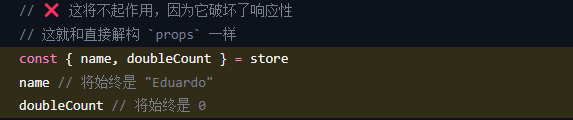
注意,store 是一个用 reactive 包装的对象,这意味着不需要在 getters 后面写 .value。就像 setup 中的 props 一样,我们不能对它进行解构

image-20240722152455133

如何从Store中解构

解构赋值会是数据失去响应性。!!!!

为了从 store 中提取属性时保持其响应性,你需要使用 storeToRefs()。它将为每一个响应式属性创建引用。当你只使用 store 的状态而不调用任何 action 时,它会非常有用。请注意,你可以直接从 store 中解构 action,因为它们也被绑定到 store 上:

1
2
3
4
5
6
7
8
9
10
<script setup>
import { storeToRefs } from 'pinia'
const store = useCounterStore()
// `name` 和 `doubleCount` 是响应式的 ref
// 同时通过插件添加的属性也会被提取为 ref
// 并且会跳过所有的 action 或非响应式 (不是 ref 或 reactive) 的属性
const { name, doubleCount } = storeToRefs(store)
// 作为 action 的 increment 可以直接解构
const { increment } = store
</script>

Store上的$subscribe方法

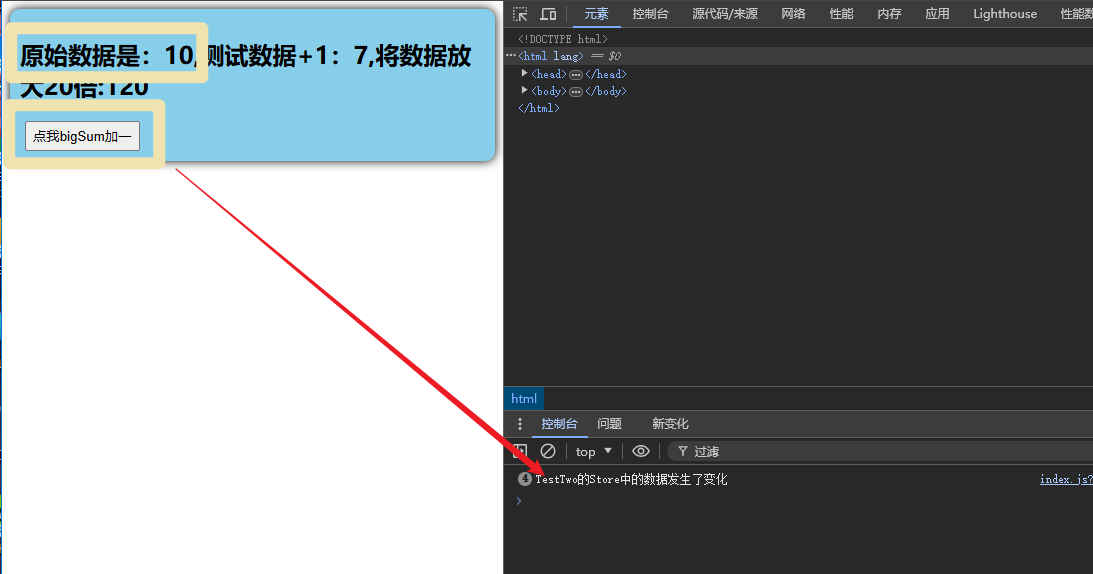
$subscribe方法的作用类似于watch,当store中的数据发生变化时,会触发该函数

1
2
3
TestStore.$subscribe(()=>{
console.log('TestTwo的Store中的数据发生了变化');
})

效果:

image-20240722182253414

该函数注意点有:

  1. $subscribe(()=>{}),要传入一个箭头函数,若要使用this,传入常规函数即可
  2. 该函数可以收到两个参数,mutatestate,mutate是本次修改的信息,state就是我们在store中定义的state。
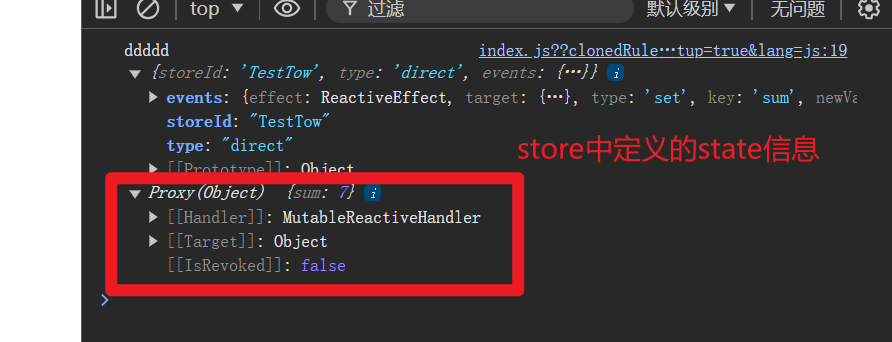
image-20240722182646582

State

访问 state

默认情况下,你可以通过 store 实例访问 state,直接对其进行读写。

1
2
3
4
5
6
7
8
9
10
11
12
13
14
15
16
17
18
19
20
21
22
23
24
25
26
27
28
<template>
<div class="count">
<h2>当前求和为:{{ TestStore.sum }}</h2>
<select v-model.number="n">
<option value="1">1</option>
<option value="2">2</option>
<option value="3">3</option>
</select>
<button @click="add"></button>
<button @click="catDown"></button>
</div>
</template>

<script setup>

import { ref } from 'vue';
//引入store实例对象
import {useTestStore} from '@/store/TestTwo'
let n = ref(0)
//调用函数来进行访问
const TestStore = useTestStore()
console.log(TestStore);
//方法
function add(){
}
function catDown(){
}
</script>

如果你的属性没有定义在state函数中,那么自然也访问不到。

变更 state(修改数据)

1.最基本的方法

1
2
//这里拿上边的例子
TestStore.sum = 4(新值即可)

2.$pacth方法

依旧是上面的例子,写法这么写,可以传入一个对象

1
2
3
4
TestStore.$patch({
//写入要更改的内容
sum:9
})

写法2

针对于对集合的修改,我们也可以传入一个函数来实现

1
2
3
4
TestStore.$patch((state)=>{
state.items.push({name:'小李',quantity:1})
state.hasChanged = true
})

3.通过定义Action选项修改

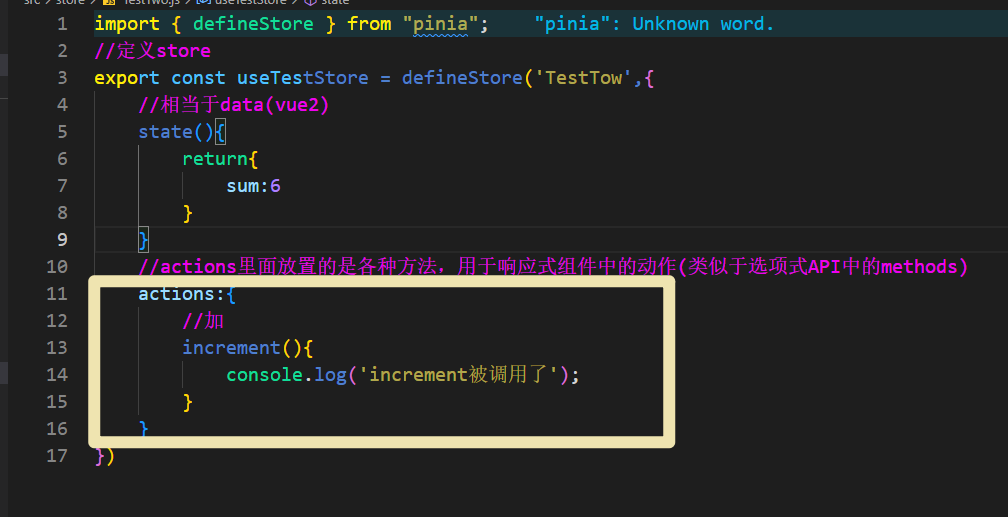
1.首先我们需要在store中配置actions选项

1
2
3
4
5
6
actions:{
//加
increment(){
console.log('increment被调用了');
}
}

image-20240722171511699

2.通过store实例调用这个方法(actions)

1
TestStore.increment()

Getter

Getter完全等同于store中state的计算值,类似于计算属性

在defineStore函数中定义getters配置项

1
2
3
4
5
6
7
8
9
10
11
getters:{
//实际上this就相当于state,可以使用this也可以使用state
//箭头函数
testSum:(state)=>{
return state.sum+1
},
//一般函数
bigSum(){
return this.sum * 20
}
}
1
2
//解构赋值
const {bigSum,testSum} = TestStore
1
2
3
4
5
6
<!--页面渲染-->
<template>
<div class="count">
<h2>原始数据是:{{ TestStore.sum }},测试数据+1:{{ testSum }},将数据放大20倍:{{ bigSum }}</h2>
</div>
</template>

效果

image-20240722175910023

Action

Action 相当于组件中的 method。它们可以通过 defineStore() 中的 actions 属性来定义,并且它们也是定义业务逻辑的完美选择。

1
2
3
4
5
6
7
8
9
10
11
12
13
export const useCounterStore = defineStore('main', {
state: () => ({
count: 0,
}),
actions: {
increment() {
this.count++
},
randomizeCounter() {
this.count = Math.round(100 * Math.random())
},
},
})

组合式定义Store

上面的写法,是选项式写法,下面介绍一些组合式定义Store

注意点有2:

  1. 在组合式中,我们并不需要去写state,getters,actions,而是用vue中的ref或者reactive定义state中的响应式变量,直接通过function + 函数名字来定义函数即可。
  2. 要记得把要用到的数据和方法return出去
  3. 示例写法如下:
1
2
3
4
5
6
7
8
9
10
11
12
13
14
15
16
17
18
19
20
//组合式写法
import { ref, computed } from "vue";
export const useTestStore = defineStore('TestTwo', () => {
//相当于data(vue2)
//切记,使用ref定义响应式时,操作数据不要忘记加.value
let sum = ref(6)
let testNum = ref(0)
let testSum = ref(0)

//组合式的actions
function increment() {
testNum.value = testSum.value +=1
return testNum.value
}
//组合式的getters
const bigSum = computed(()=>{
return sum.value * 20
})
return {increment,bigSum,testNum}
},)